How Coder works
Coder sits between you and the coding agents you already use. It makes the quick calls itself, sends only the hard part of the work to the big model, and holds the few steps that are hard to undo until you say yes. This page shows how, with the numbers from our own test.
Most agents send every step to the big model
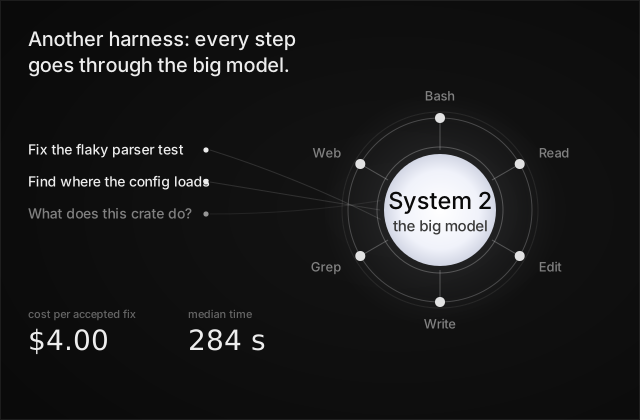
In most coding agents, your message goes straight to one big model, and so does every step after it. Reading a file, searching, running the tests: each result goes back into the model, and the model reads the whole conversation again before the next step, so a long test log is read again on every step after it. That is where the time and the money go. The numbers in the picture are plain Claude Code's, from the test below.
System 1 in front
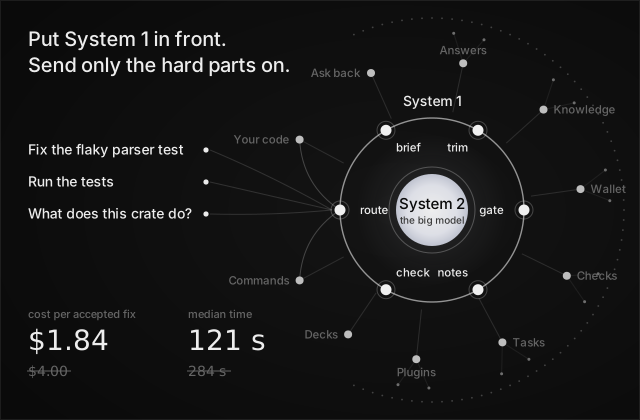
In our test, the same model (Claude Opus 5.5) fixed 21 closed issues three times each: once as plain Claude Code, and once with a briefing in front and only the commands it needed. Both got 19 of 63 fixes accepted. With the briefing, each accepted fix cost $1.84 instead of $4.00, and the median run took 121 seconds instead of 284. How we measured it.
Coder puts a ring of quick decisions in front of the big model. We call it System 1: small judgments made in a fraction of a second, before the big model sees anything. The big model is System 2, kept for the part that needs it, which is writing the change.
- Route. Each new message goes where it's best answered. A question Coder can answer from what it knows doesn't wake the big model, and unrelated new work starts fresh instead of dragging the old conversation along.
- Brief. Coder finds the files that matter and hands them over, so the agent doesn't spend its first minutes searching.
- Trim. Long build and test output reaches the agent as the lines that decide the next step. The whole output is saved to a file it can open.
- Gate. A script the agent hasn't read waits for a read first when running it blind looks risky.
- Notes. The first time the agent works in a folder, it gets that folder's own instructions.
- Check. An agent working on an issue that says it's done without passing its checks is sent back with what failed.
These come together as the Token savers plugin, on by default. You
can turn it off in /plugins; see Coder's plugins.
One Coder in front of every agent
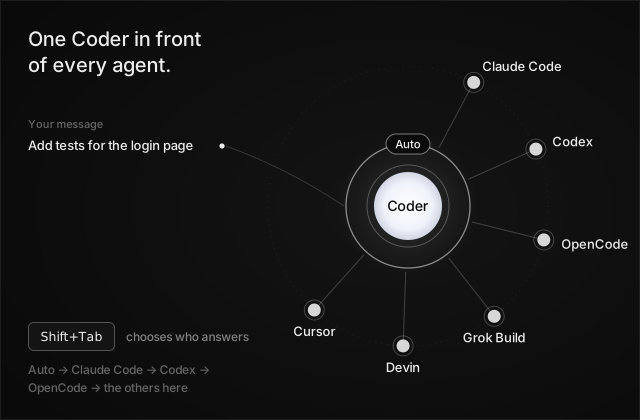
Coder isn't another agent to switch to. It's the same chat in front of the agents you already have: Claude Code and Codex on your own plans, OpenCode, Coder's own loop, and others such as Grok Build, Devin CLI, and Cursor when they're installed here.
A new chat starts on Auto, and Coder picks who answers. Press
Shift+Tab to choose yourself: Auto, then Claude Code, Codex, OpenCode,
and the other agents found on this computer. Any chat can also hand a
piece of work to another agent and keep going. See
Choose who answers.
Hard-to-undo steps wait for you
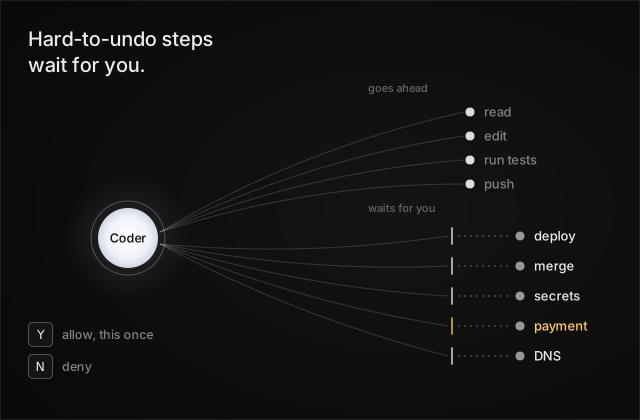
Ordinary work goes ahead without asking: reading and editing files, builds, tests, and pushing commits. Five kinds of step always wait for you, whichever agent is answering: a production deploy, merging a pull request, reading or changing a secret, a payment, and a DNS change.
Coder shows the exact command and asks one plain question. Y allows it
this once; N or Esc denies it, and the agent carries on with the rest
of the work. See Safety.
Next: Use Coder in the terminal.